Radiant Optimizer Games
About xFPS
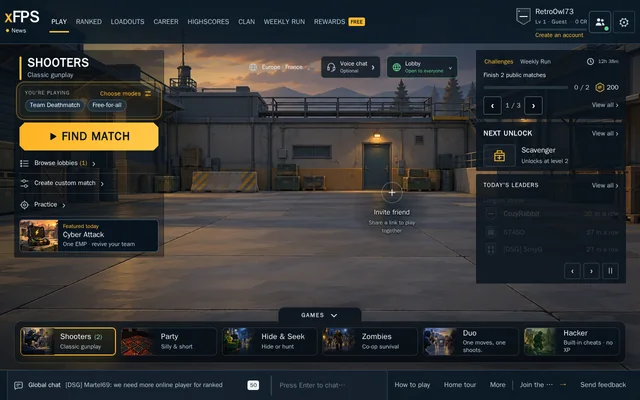
xFPS is a free desktop browser first-person shooter developed by Bink Online. It offers classic arena gunplay across playlists including Shooters (Team Deathmatch, Free for All, Domination, Hardpoint, Search & Destroy, Cyber Attack and 2v2 Gunfight), Party modes, Hide & Seek and Co-op Zombies. Players can customize loadouts, join public lobbies, create private rooms with friends or practice offline against bots.
xFPS in the browser
This page links directly to the official xFPS site at xfps.io, built by Bink Online. No download or account is required to play as a guest; optional accounts save progression and ranked stats. Our desktop Chrome check on November 20, 2026 verified guest lobby loading, playlists, sensitivity setup and launching an offline bot match on Foundry. Live public multiplayer matchmaking and voice chat were not verified. Use a desktop browser with keyboard, mouse and hardware graphics acceleration enabled.
How to play xFPS online
- Open Play now to enter the lobby as a guest; no account or download is required.
- Pick a playlist at the bottom (Shooters, Party, Hide & Seek or Zombies), then click Find Match, Browse lobbies or Practice → Offline with bots.
- Before your first round, pick a mouse sensitivity preset and click Save and play. Use WASD, mouse and R/Space in combat.
⚠ Never download a launcher or .exe from a browser game page.
Tips for xFPS
- Start with Practice → Offline with bots to dial in mouse sensitivity before jumping into ranked or public lobbies.
- Keep browser hardware graphics acceleration enabled so 3D maps run smoothly instead of dropping to Very Low.
- Explore the bottom playlist switcher for Co-op Zombies, Hide & Seek and Party modes beyond standard Team Deathmatch.
xFPS: questions and answers
Can I play xFPS online for free?
Yes. xFPS opens in a browser tab on the project's own site, with no download and no sign-up.
Do I need to install xFPS?
No. Everything runs inside the browser tab. Close the tab and nothing stays on your computer apart from the browser cache.
Does xFPS work on a phone or Chromebook?
It is built for desktop browsers. Chromebooks with an up-to-date Chrome usually work if they have enough memory; phones are not officially supported.
Why is xFPS not loading?
Fan-made browser ports often run on small servers. Wait a minute and refresh, use Chrome or Edge on a desktop, close other heavy tabs, and make sure no extension is blocking the page.
Can I play xFPS without creating an account?
Yes. The site assigns a guest profile immediately so you can browse lobbies, launch offline bot matches or join casual play without signing up. Account creation is optional.
What modes are included in xFPS?
The lobby groups modes into Shooters (Team Deathmatch, Free for All, Domination, Hardpoint, Search & Destroy, Cyber Attack, 2v2 Gunfight), Party modes, Hide & Seek and Co-op Zombies, plus private rooms and offline bots.
Why does xFPS ask about hardware acceleration?
It is a 3D WebGL shooter. Enabling hardware graphics acceleration in Chrome, Edge or Firefox keeps frame rates smooth; without it the game drops to Very Low graphics and warns you.