Radiant Optimizer Games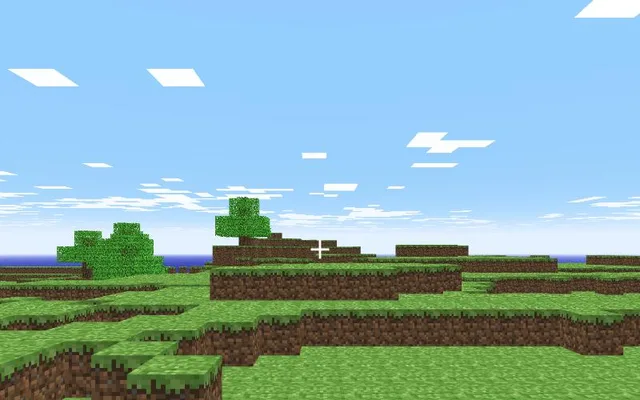
About Minecraft Classic
Minecraft Classic is the creative-only version of Minecraft from 2009, when the game was still in its earliest days. For the game's 10th anniversary in 2019, Mojang re-released it for free in the browser, original quirks and bugs included. There are no monsters, crafting or survival: just 32 blocks and an open world to build in.
Minecraft Classic in the browser
This is Mojang's own official page, so it is completely free and legal. It loads in seconds with no account. You can share an invite link from the in-game menu so friends join the same world, but worlds are not kept forever.
How to play Minecraft Classic online
- Use a desktop browser (Chrome or Edge works best).
- Click “Play now”. The game opens in a new tab on the original project's site.
- Wait for the first load; big games can download hundreds of MB.
- Click inside the game to capture the mouse. Press Esc to release it.
⚠ Never download a launcher or .exe from a browser game page.
Tips for Minecraft Classic
- Press B to open the block menu and pick from all 32 blocks.
- Share the invite link from the menu to build with friends in the same world.
- Worlds are not kept forever, so take screenshots of builds you are proud of.
Minecraft Classic: questions and answers
Can I play Minecraft Classic online for free?
Yes. Minecraft Classic opens in a browser tab on the project's own site, with no download and no sign-up.
Do I need to install Minecraft Classic?
No. Everything runs inside the browser tab. Close the tab and nothing stays on your computer apart from the browser cache.
Does Minecraft Classic work on a phone or Chromebook?
It is built for desktop browsers. Chromebooks with an up-to-date Chrome usually work if they have enough memory; phones are not officially supported.
Why is Minecraft Classic not loading?
Fan-made browser ports often run on small servers. Wait a minute and refresh, use Chrome or Edge on a desktop, close other heavy tabs, and make sure no extension is blocking the page.
Is this the official Minecraft Classic?
No. This page links to an independent web project. Neither Radiant Optimizer Games nor the project is affiliated with Mojang Studios.