Radiant Optimizer Games
About Tyrian
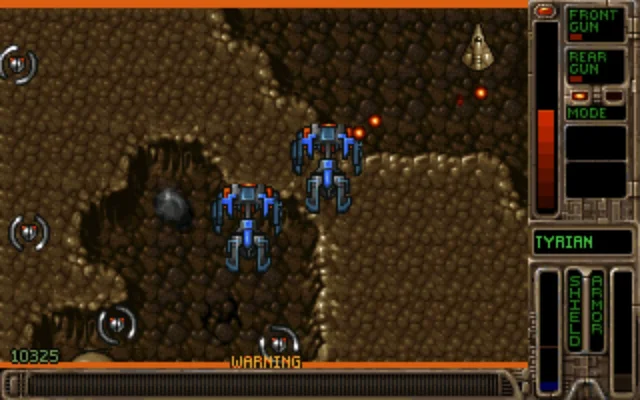
Tyrian is a classic DOS scrolling shooter with a science-fiction story, enemy formations and ship upgrades. You pilot Trent Hawkins through hostile territory, balancing continuous fire with careful movement. The single-player campaign has a preparation menu between missions where you can read messages, inspect the ship and browse upgrades before choosing the next stage.
Tyrian in the browser
This is an unofficial browser adaptation of OpenTyrian hosted by the port developer, pelya. The project identifies its Tyrian 2.1 game data as freeware. You can start without an account, installation or importing your own files. Use a desktop keyboard: the first-stage movement, firing and return to the preparation menu have been checked in Chrome. Touch controls and saving between visits have not been verified.
How to play Tyrian online
- Open Play now, wait for the title screen, then choose Start New Game with the arrow keys and Enter.
- Choose 1 Player Full Game and a difficulty. In the preparation menu, select Play Next Level, then Tyrian.
- Move with the arrow keys and hold Space to fire. Escape opens the in-game menu; after Game Over, press Enter to return to preparation.
⚠ Never download a launcher or .exe from a browser game page.
Tips for Tyrian
- Leave yourself room to dodge instead of staying at the screen edge.
- Watch the shield and armor meters while firing; scoring points does not protect the ship.
- Read the preparation menu before each mission and use the arrow keys if mouse clicks do not respond.
Tyrian: questions and answers
Can I play Tyrian online for free?
Yes. Tyrian (OpenTyrian) opens in a browser tab on the project's own site, with no download and no sign-up.
Do I need to install Tyrian?
No. Everything runs inside the browser tab. Close the tab and nothing stays on your computer apart from the browser cache.
Does Tyrian work on a phone or Chromebook?
It is built for desktop browsers. Chromebooks with an up-to-date Chrome usually work if they have enough memory; phones are not officially supported.
Why is Tyrian not loading?
Fan-made browser ports often run on small servers. Wait a minute and refresh, use Chrome or Edge on a desktop, close other heavy tabs, and make sure no extension is blocking the page.
Is this an official browser release?
No. This is a community browser adaptation of the open-source OpenTyrian project, not an official release by the original game publisher.
Do I need to supply game files?
No. This linked build loads its game data automatically; the project README identifies Tyrian 2.1 data as freeware.
Will my progress survive closing the tab?
Save persistence between visits has not been verified for this build. Do not rely on closing the tab to preserve a campaign.