Radiant Optimizer Games
About Trainsworld
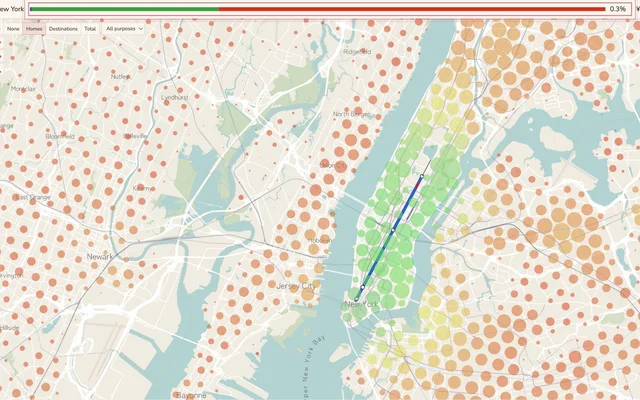
Trainsworld is a railway management game played on real city maps. Start with a budget, study where people live and where they need to go, then connect those places with tracks and stations. Turn your infrastructure into lines, assign trains for different demand periods, and watch ridership, occupancy and profit. The challenge is to build useful connections without spending too much on capacity that goes unused.
Trainsworld in the browser
This original browser game is hosted on creator Anita Chen’s own website. Normal and sandbox modes are available, with city choices including New York, London, Paris, Guangzhou and Tokyo. Our desktop Chrome test covered building a New York line, running trains, automatic saving and restoring the saved city. No account or installation was needed. This listing recommends desktop play; phone controls and other browsers have not been verified.
How to play Trainsworld online
- Open Play now to visit the creator’s site in a new tab; desktop Chrome was tested.
- Choose New game, a city and normal or sandbox mode. Wait for the city map to load.
- Plan tracks and stations in Build, construct the plan, then create a line and select its stops.
- Assign trains in the line’s timetable and run the simulation. Watch demand, occupancy and your budget.
⚠ Never download a launcher or .exe from a browser game page.
Tips for Trainsworld
- Start with a short line linking homes to useful destinations. Use the demand map before committing your construction budget.
- Tracks alone do not run a service: place stations, construct the plan, create a line and assign trains to its timetable.
- Watch occupancy and passengers left at stations before adding trains. Check the saved-game entry before closing a long session.
Trainsworld: questions and answers
Can I play Trainsworld online for free?
Yes. Trainsworld opens in a browser tab on the project's own site, with no download and no sign-up.
Do I need to install Trainsworld?
No. Everything runs inside the browser tab. Close the tab and nothing stays on your computer apart from the browser cache.
Does Trainsworld work on a phone or Chromebook?
It is built for desktop browsers. Chromebooks with an up-to-date Chrome usually work if they have enough memory; phones are not officially supported.
Why is Trainsworld not loading?
Fan-made browser ports often run on small servers. Wait a minute and refresh, use Chrome or Edge on a desktop, close other heavy tabs, and make sure no extension is blocking the page.
Do I need an account or download?
No account or installation was needed to start and run a city in our browser test. Open the creator’s site and choose a new game.
Does Trainsworld save progress?
Yes. We observed automatic saving and successfully reloaded our city with its line and stations. The start screen also offers a Load from file option.
Can I play on a phone?
This listing covers desktop play tested in Chrome. Phone controls and performance have not been verified.