Radiant Optimizer Games
About Dimension 9
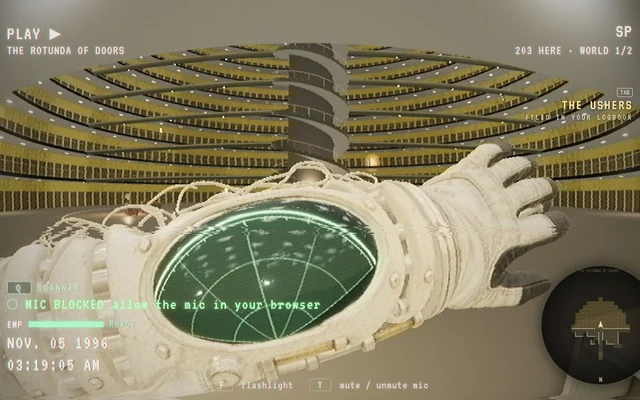
Dimension 9 turns Backrooms exploration into a journey through strange connected spaces. Walk from the Atrium into flooded halls and towering rooms, discover residents and hunters, and record places in your logbook. Its unsettling atmosphere and creature encounters include scares.
Dimension 9 in the browser
Play on the creator’s own site as a guest, without installing a launcher or creating an account. Desktop movement, three discoverable areas, the map, logbook, scanner and EMP were checked on November 12, 2026. Exploration remains playable without microphone permission. Voice chat, mobile controls and the full world have not been verified.
How to play Dimension 9 online
- Use a desktop browser (Chrome or Edge works best).
- Click “Play now”. The game opens in a new tab on the original project's site.
- Wait for the first load; big games can download hundreds of MB.
- Click inside the game to capture the mouse. Press Esc to release it.
⚠ Never download a launcher or .exe from a browser game page.
Tips for Dimension 9
- Click inside the game to control the view; use a keyboard and mouse for exploration.
- Check the map and logbook when you enter a new area. Discovered places help you retrace your route.
- Save EMP for a close encounter: it enters a 90-second cooldown. Read each hunter’s escape instructions after being caught.
Dimension 9: questions and answers
Can I play Dimension 9 online for free?
Yes. Dimension 9 opens in a browser tab on the project's own site, with no download and no sign-up.
Do I need to install Dimension 9?
No. Everything runs inside the browser tab. Close the tab and nothing stays on your computer apart from the browser cache.
Does Dimension 9 work on a phone or Chromebook?
It is built for desktop browsers. Chromebooks with an up-to-date Chrome usually work if they have enough memory; phones are not officially supported.
Why is Dimension 9 not loading?
Fan-made browser ports often run on small servers. Wait a minute and refresh, use Chrome or Edge on a desktop, close other heavy tabs, and make sure no extension is blocking the page.
Is a microphone required?
No. Exploration worked without microphone permission in our desktop test. Voice features are optional and were not tested.
Does it work on phones?
Our listing covers desktop keyboard and mouse play. Phone controls and performance have not been verified.